Single Cell RNA-seq Analysis with Bioconductor
Overview
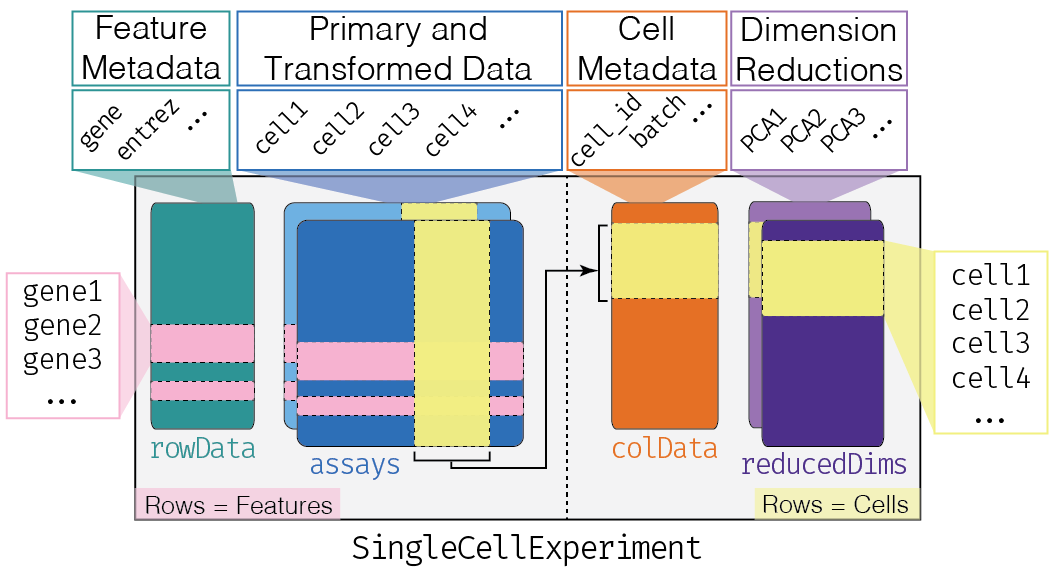
During the lab session we practiced analyzing 10x Genomics data starting with output files from the 10x Genomics Cell Ranger pipeline. While this demonstrates how you might analyze new data that you generate, there are many public datasets that you may wish to explore starting with the analysis already conducted by the original authors. In this assignment, you will obtain data from the Tabula Muris Senis, a cell atlas of 23 tissues and organs from mice across their lifespan. The data are distributed by CZ CELLxGENE, which standardizes cell type labels using the Cell Ontology. After loading and exploring the quality of the Kidney dataset, you will identify marker genes and use gene set analysis to gain insights into the functions of different segments of the nephron.
Refer to the Bioconductor OSCA book for more information on
- https://bioconductor.org/books/OSCA.intro – Loading data and working with SingleCellExperiment objects
- https://bioconductor.org/books/OSCA.basic – Analyzing data from normalization to marker gene detection
Use help() to display the built-in R Documentation for a given function (e.g. help(sort)) after loading the appropriate package
Exercises
There are three exercises in this assignment:
- Load the Tabula Muris Senis Kidney data and inspect the counts and cell metadata
- Explore the data at the gene-level, cell-level, and percent of stress gene reads
- Identify marker genes for the proximal convoluted tubule and the thick ascending limb of the loop of Henle
Before you do anything else, create an R script for this assignment. Everything you’ll need to do for this assignment will be done in this script and submitted via GitHub. Use comments to separate your code blocks into Exercise 1, Step 1.1; Exercise 1, Step 1.2; etc., and include written answers to questions as comments. You must show your work to receive full credit for each question by providing the code you used.
The nephron
The nephron is the functional unit of the kidney. Blood is filtered in the glomerulus and the filtrate is captured by Bowman’s capsule. As the filtrate flows along the tubule, each segment is lined by specialized epithelial cells that reabsorb or secrete different molecules
- Proximal convoluted tubule – reabsorbs most of the filtered water and salt along with nearly all of the glucose and amino acids
- Loop of Henle – dips into the medulla; the thick ascending limb pumps salt out of the filtrate but is impermeable to water, helping the kidney concentrate urine
- Distal convoluted tubule – fine-tunes the reabsorption of salt, calcium, and magnesium
- Collecting duct – adjusts the final amount of water in the urine in response to hormones

Kidney Nephron by Holly Fischer, CC BY 3.0
Besides nephron epithelial cells, the kidney also contains endothelial cells lining the blood vessels, stromal cells such as mesangial cells and fibroblasts, and resident and circulating immune cells.
Each of these appears as a cell_type in the Tabula Muris Senis data, e.g. kidney proximal convoluted tubule epithelial cell and kidney loop of Henle thick ascending limb epithelial cell.
1. Load data
Load packages
Load the following packages using library()
- zellkonverter – loads single cell data from the popular H5AD file format and creates a SingleCellExperiment object
- HDF5Array – reads matrices stored inside HDF5 files such as H5AD
- scuttle, scater, and scran – provide core single cell functionality
- ggplot2 – data visualization
- clusterProfiler and org.Mm.eg.db – gene set analysis using mouse gene annotations
Load and inspect data (0.5 pt)
Load Kidney data from CELLxGENE
- Go to the Tabula Muris Senis collection, find “Kidney - A single-cell transcriptomic atlas characterizes ageing tissues in the mouse - 10x”, and download the H5AD file (should be 343 MB). Rename it to
kidney_10x.h5ad - Create a SingleCellExperiment object named
kidneyby loadingkidney_10x.h5adusingreadH5AD()from zellkonverter and settingreader="R"- You may need to install zellkonverter using
BiocManager::install( "zellkonverter" )
- You may need to install zellkonverter using
- The
Xassay contains values that were normalized and scaled by the authors. Replace it with the raw counts, which are stored inside the H5AD file atraw/X, and rename the assay tocounts
assay( kidney, "X", withDimnames=FALSE ) <- as( H5SparseMatrix( "kidney_10x.h5ad", "raw/X" ), "dgCMatrix" )
assayNames(kidney) <- "counts"
- Genes are named by Ensembl IDs (e.g. ENSMUSG00000029422). Use gene symbols instead with
rownames(kidney) <- rowData(kidney)$feature_name - Normalize counts using
kidney <- logNormCounts(kidney)
Question 1: Inspect the kidney SingleCellExperiment object (0.5 pt)
- How many genes are quantitated (should be >10,000)?
- How many cells are in the dataset?
- What dimension reduction datasets are present?
Inspect cell metadata (0.5 pt)
Question 2: Inspect the available cell metadata (0.5 pt)
- How many columns are there in
colData(kidney)? - Which three column names reported by
colnames()seem most interesting? Briefly explain why. - Plot cells according to
X_umapusingplotReducedDim()and colouring bycell_typeand submit this plot
2. Explore data
Explore gene-level statistics (1 pt)
Sum the expression of each gene across all cells
- Create a vector named
genecountsby usingrowSums()on the counts matrix returned bycounts(kidney)
Question 3: Explore the genecounts distribution (1 pt)
- What is the mean and median genecount according to
summary()? What might you conclude from these numbers? - What are the three genes with the highest expression after using
sort()? What do the gene names stand for?
Explore cell-level statistics (1 pt)
Question 4a: Explore the total expression in each cell across all genes (0.5 pt)
- Create a vector named
cellcountsusingcolSums() - Create a histogram of
cellcountsusinghist() - What is the mean number of counts per cell?
- How would you interpret the cells with much higher total counts (>10,000)?
Question 4b: Explore the number of genes detected in each cell (0.5 pt)
- Create a vector named
celldetectedusingcolSums()but this time oncounts(kidney)>0 - Create a histogram of
celldetectedusinghist() - What is the mean number of genes detected per cell?
- What fraction of the total number of genes does this represent?
Explore stress gene reads (1 pt)
Solid tissues such as the kidney must be digested with enzymes at 37°C to release single cells. This dissociation can rapidly switch on immediate early genes (e.g. Fos, Jun, Egr1) and heat shock genes (e.g. Hspa1a), so the percent of reads from these stress genes is a useful quality metric. Sum the expression of a set of stress genes across each cell
- Create a vector named
stressof stress gene names usingstress <- c( "Fos", "Fosb", "Jun", "Junb", "Egr1", "Atf3", "Ier2", "Hspa1a", "Hspa1b" ) - Confirm that all of these genes are present using
stress %in% rownames(kidney) - Create a DataFrame named
dfusingperCellQCMetrics()specifying thatsubsets=list(Stress=stress) - Confirm that the mean sum and detected match your previous calculations by converting
dfto a data.frame usingas.data.frame()and then runningsummary() - Add metrics to cell metadata using
colData(kidney) <- cbind( colData(kidney), df )
Question 5: Visualize percent of reads from stress genes (1 pt)
- Use
plotColData()to plot thesubsets_Stress_percenton the y-axis against thecell_typeon the x-axis rotating the x-axis labels usingtheme( axis.text.x=element_text( angle=90, hjust=1, vjust=0.5 ) )and submit this plot - Which cell types have a higher percentage of stress gene reads? Why might this be the case?
3. Identify marker genes
Identify marker genes for every cell type compared with all other cells
- Create a list named
marker.infothat contains the pairwise comparisons between all cell types usingscoreMarkers( kidney, colData(kidney)$cell_type )
Analyze the proximal convoluted tubule (3 pt)
- Identify the top marker genes in the proximal convoluted tubule according to
mean.AUCusing the following code
chosen <- marker.info[["kidney proximal convoluted tubule epithelial cell"]]
ordered <- chosen[order(chosen$mean.AUC, decreasing=TRUE),]
head(ordered[,1:4])
Question 6a: Evaluate top marker genes (1 pt)
- What are the six top marker genes in the proximal convoluted tubule?
- Plot the expression of the top marker gene across cell types using
plotExpression()and specifying the gene name as the feature andcell_typeas the x-axis and submit this plot
Question 6b: Gene set analysis (2 pt)
- Create a vector
goithat contains the names of the top 200 genes of interest byrownames(ordered)[1:200] - Test for enriched Gene Ontology biological processes using the following code and submit this plot
- You may need to install org.Mm.eg.db using
BiocManager::install( "org.Mm.eg.db" )
- You may need to install org.Mm.eg.db using
ego <- enrichGO( goi, OrgDb=org.Mm.eg.db, keyType="SYMBOL", ont="BP", universe=rownames(kidney) )
head( ego )
dotplot( ego )
- What are the top three GO terms? Based on these terms and the functions of the top six marker genes at NCBI Gene, what class of molecules does the proximal convoluted tubule appear to specialize in metabolizing?
Analyze the thick ascending limb (3 pt)
Repeat the analysis for the thick ascending limb of the loop of Henle
- Identify marker genes for
kidney loop of Henle thick ascending limb epithelial cell
Question 7: Evaluate top marker genes (3 pt)
- Create a vector
goithat contains the names of the top six genes of interest byrownames(ordered)[1:6] - Plot the expression of the top six marker genes across cell types using
plotExpression()and specifying thegoivector as the features and submit this plot - Which other cell type expresses several of these markers? Looking at the labels, what might explain this?
- Which marker looks most specific for the thick ascending limb? What drug class targets the protein it encodes?
- Run
enrichGO()on the top 200 marker genes. What are the top GO terms, and why might this cell type need them?
Submit
Submit an R script with your code and answers to questions for
- Loading data (0.5 pt)
- Exploring data (2.5 pt)
- Identifying marker genes (3 pt)
Be sure to include the following plots
- UMAP of cells coloured by cell_type (0.5 pt)
- Cell type vs % stress gene reads (0.5 pt)
- Expression plot of top marker gene in the proximal convoluted tubule according to cell type (1 pt)
- GO enrichment dotplot for the proximal convoluted tubule (1 pt)
- Expression plot of top six marker genes in the thick ascending limb according to cell type (1 pt)